marqius-pdfRender & check PDFs
Make a PDF from local HTML and check the result. Includes the sample invoice.
HTML in. Print PDF out.
Render and check PDFs locally with marqius-wkhtmltopdf. Keep the wkhtmltopdf commands your app already uses.
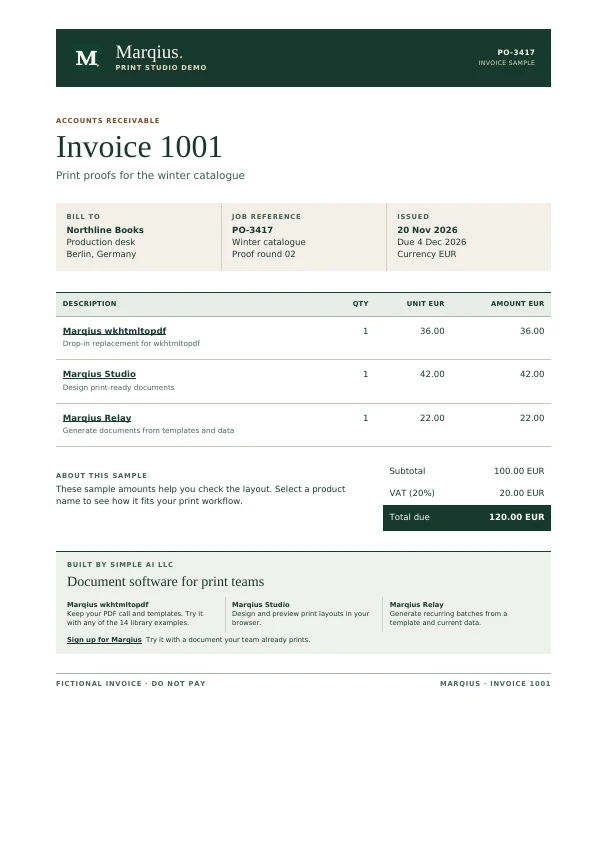
marqius-wkhtmltopdf --page-size A4 invoice.html invoice.pdf
pdfinfo invoice.pdf | grep '^Pages:'
Pages: 1
For Apple silicon Macs and x86-64 or ARM64 Linux. Install in your user folder and make the CLI available in this shell.
curl -fsSLo marqius-install.sh https://marqius.com/marqius-wkhtmltopdf.sh &&
  sh marqius-install.sh --version 0.12.8 --prefix "$HOME/.local/bin" --no-wkhtmltopdf &&
  export PATH="$HOME/.local/bin:$PATH" &&
marqius-wkhtmltopdf --versionGive your agent the commands and checks it needs to work with Marqius.
marqius-pdfMake a PDF from local HTML and check the result. Includes the sample invoice.
marqius-migrateFind your library’s executable setting and compare PDFs before switching.
In your project, extract the two skill folders into .agents/skills/. Open a new Codex session in that project and try this prompt.
$marqius-pdf Render the bundled sample invoice and check its page count and total.With Docker running, copy these commands into a shell. Open invoice.pdf and look for one A4 page, Invoice 1001 and a total of 120.00 EUR.
mkdir -p marqius-cli-demo
cd marqius-cli-demo
curl -fsSLo invoice.html https://marqius.com/download/wkhtmltopdf-demo/0.12.8/invoice.html.txt &&
  docker run --rm --network none --mount "type=bind,source=$PWD,target=/data" \
marqius/wkhtmltopdf:0.12.8 --page-size A4 invoice.html invoice.pdfGenerate a PDF using the page size your document needs.
marqius-wkhtmltopdf --page-size A4 invoice.html invoice.pdfCheck the output from your current setup against the candidate PDF.
marqius-wkhtmltopdf compare original.pdf candidate.pdfConsult the flags for your installed release.
marqius-wkhtmltopdf -HUse the public marqius-wkhtmltopdf executable on a supported platform or the versioned Docker image. Both accept wkhtmltopdf-style commands for rendering HTML as PDF.
Yes. The download contains two portable SKILL.md folders. The page shows the workspace locations for Codex, Claude Code, OpenCode, Antigravity, Gemini CLI, and GitHub Copilot CLI.
The Docker example renders the bundled invoice locally without a Marqius account. Review the licence and trial options before using the converter in production.
Use marqius-pdf to render and inspect a PDF. Use marqius-migrate to find the executable setting in an existing integration, test a candidate and keep a rollback path.
The public edition is designed for libraries that launch wkhtmltopdf as an executable. Apps that load libwkhtmltox directly require a separate integration. Compare representative PDFs before switching.